
Last Updated: October 30, 2026
Quick Summary
Warehouse lighting flickers after a power surge because the spike disturbs the electrical supply feeding the fixtures, often upsetting LED drivers and circuits. The cause is usually loose connections, damaged wiring, faulty drivers, or utility-side faults rather than the bulbs themselves.
- Surges last only a fraction of a second but can still upset LED drivers and their circuits.
- Loose connections and damaged wiring are among the most frequent causes of post-surge flicker.
- Repeated surges can weaken LED drivers, so flicker often traces to the driver rather than the light engine.
- Never open an energized panel or fixture; de-energize, lock out, and call a licensed electrician.
- Escalate immediately if you see burning smells, repeated breaker trips, buzzing, arcing, or flicker lasting over a day.
Table of Contents
- What Happens to Warehouse Lighting During a Power Surge
- Common Causes of Flickering Lights After a Surge
- LED Lights Flickering After Power Surge: Why Drivers Are Often the Culprit
- How a Power Surge Damages LED Drivers and Control Systems
- Warehouse Lighting Troubleshooting: A Safe, Ordered Checklist
- Operational and Safety Risks of Ignoring Flickering Lights
- Booking a Commercial Building Electrical Inspection After a Surge
- Frequently Asked Questions
What Happens to Warehouse Lighting During a Power Surge
Warehouse lighting flickers after a power surge because the surge disturbs the electrical supply to the fixtures.
For facility managers, the real question is why the lights come back unevenly.
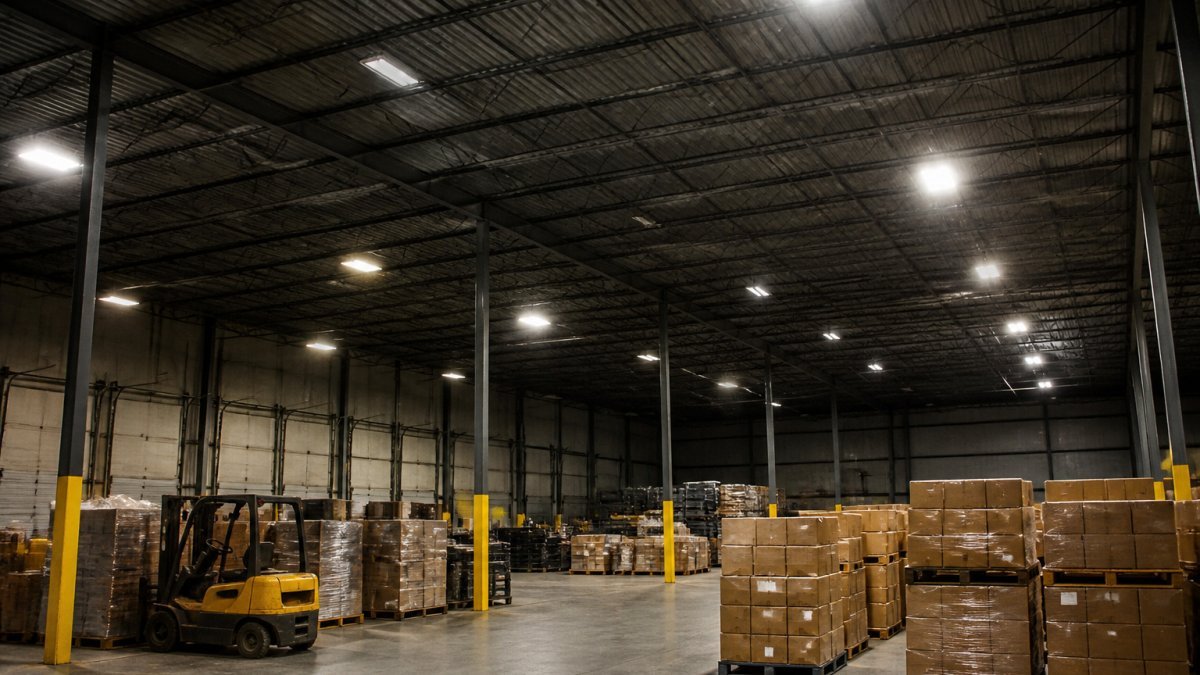
Warehouse lighting is a high-stakes system. A single flickering high-bay can leave an aisle dim, and a dim aisle is a hazard for forklift drivers and pedestrians alike.
Power surges and brief outages can come from several places. This guide starts with what the surge actually does to the lighting circuit.
Common Causes of Flickering Lights After a Surge
Flickering after a surge usually traces back to one of a few causes. Some are simple to fix. Others point to a deeper problem in the electrical system.
The most common causes include:
- Loose connections at fixtures, junction boxes, or breaker terminals
- Damaged wiring from heat, vibration, or past surges
- Faulty LED drivers that cannot handle voltage swings
A common mistake is assuming the bulbs are the problem. In most warehouse cases, the bulbs are fine, and the fault sits upstream in the circuit.
Loose Connections and Damaged Wiring
Loose connections are one of the most frequent causes of flickering. A surge can push a connection that was already marginal into a state where it intermittently breaks contact.
Damaged wiring often goes hand in hand with loose connections. Look for discolored insulation, a burnt smell near panels, or warm spots on conduit. These signs suggest the circuit has been stressed and needs an electrician’s attention.
Utility-Side Faults and Brief Outages
Not every flicker starts inside your building. A powerline fault, a short circuit on the utility side, or a windstorm can cause a voltage dip that reaches your facility in seconds.
If the flickering happens across several buildings on the same street at the same time, the utility service is the likely source. Report the event to your utility provider and keep a log of when it occurred.
LED Lights Flickering After Power Surge: Why Drivers Are Often the Culprit
LED fixtures rely on a driver, a small power supply that converts incoming electricity into the steady current the LEDs need.
Many drivers have built-in protection, but that protection has limits, and when warehouse lighting flickers, the driver is a prime suspect.
A common mistake is replacing LED tubes or panels without checking the driver first. That approach costs more and rarely fixes the root cause.
How a Power Surge Damages LED Drivers and Control Systems
A surge does not always destroy a driver outright. More often, it causes partial damage that shows up over time.
Key effects include:
- Capacitors that lose capacity and cause unstable output
- Surge protection components that wear out and stop protecting
- Control modules, such as dimmers or occupancy sensors, that misfire
Control systems deserve special attention. Occupancy sensors and smart controls can be affected by voltage changes, so they may behave unexpectedly after a surge.
Watch out: Do not assume a driver that restarts is safe. Partial damage can return the lights to normal for a while before flicker reappears under load.
Get a Free Property Assessment →
Warehouse Lighting Troubleshooting: A Safe, Ordered Checklist
A warehouse is not a house. You may have dozens of branch circuits, multiple panels, high-bay fixtures on lifts, and lighting controls tied to occupancy sensors.

Rule one: facility staff should never open an energized panel, remove fixture covers, or probe terminals. De-energize and follow your site’s lockout/tagout procedure before any physical inspection, and only qualified personnel should perform it.
Phase 1: Document the symptom (no tools required)
- Map the pattern. Walk the affected area and mark which fixtures flicker, which are steady, and which are dark. Note whether the flicker is random, rhythmic, or tied to equipment starting up.
- Check the scope. Is it one fixture, one aisle, one circuit, one panel, or the whole building? Building-wide flicker points upstream toward the service or utility; a single fixture points to the driver or a local connection.
- Record timing. Note the date and time the flicker began relative to the surge or outage. Log whether it happens constantly or only under load.
- Ask about recent events. Confirm whether neighboring buildings or the utility reported an outage, dip, or switching event at the same time.
- Photograph and log. Use your phone to record video of the flicker and photograph panel labels and fixture nameplates. This record is what the electrician will ask for first.
Phase 2: Isolate without opening anything
- Check the breaker panel exterior. With the panel closed, look for tripped breakers, a burning smell, discoloration, or a warm cover. Do not remove the deadfront.
- Identify shared circuits. Using your panel schedule, list which fixtures share a breaker. If all flickering fixtures are on one circuit, the fault is likely on that branch.
- Test controls from the user interface. Toggle dimmers, occupancy sensors, and lighting-control apps. If the flicker stops when a sensor is bypassed or a dimmer is set to full, the control device is suspect.
- Compare unaffected areas. If a known-good circuit in another part of the building is stable, you have a baseline that helps the electrician rule out the service.
- Swap a known-good fixture (qualified staff only, power off). Moving a working fixture onto the suspect circuit, or the suspect fixture onto a known-good circuit, isolates whether the fault follows the fixture or the circuit.
Phase 3: Know when to escalate
Escalate to a licensed electrician immediately if you see any of the following:
- A burning smell, smoke, scorch marks, or discolored panel covers
- Breakers that trip repeatedly or feel hot
- Flicker that spreads to additional circuits over time
If the pattern points to the utility, flicker across multiple buildings, voltage dips reported by neighbors, or a known line event, contact your utility provider and keep the log. Do not wait for the problem to grow into an outage or a fire risk. Plan a warehouse LED lighting upgrade in New Jersey with a professional review of your facility’s lighting system.
Keep a single shared log (a spreadsheet works) with columns for date, time, location, circuit, symptom, and action taken. A clear log often cuts diagnostic time and helps the electrician go straight to the likely fault.
The table below summarises the escalation triggers and the ordered phases from the checklist so you can scan them quickly.
| Phase | Action | Stop or escalate when |
|---|---|---|
| Phase 1: Document | Map flicker pattern, check scope, record timing | Flicker spreads to more circuits over time |
| Phase 2: Isolate | Check panel exterior, identify shared circuits, test controls | Breakers trip repeatedly or feel hot |
| Phase 2: Isolate | Compare unaffected areas, swap a known-good fixture (power off) | A burning smell, smoke, or scorch marks appear |
| Phase 3: Escalate | Call a licensed electrician | Buzzing, arcing sounds, or visible sparking |
| Phase 3: Escalate | Contact utility provider and keep the log | Flicker persists more than a day after the surge |
Operational and Safety Risks of Ignoring Flickering Lights
In a warehouse, unstable lighting is not a comfort issue. It changes how people and equipment move through the space, and it can turn a routine shift into a hazard. The risks fall into four areas that general flicker articles rarely address.
Forklift and pedestrian conflicts
Forklift operators depend on consistent light to judge aisle width, rack clearances, and the position of pedestrians. Flicker and dimming reduce contrast and can make a pallet or a person harder to see at the edges of an aisle. A single dark high-bay over a cross-aisle is a collision risk, not an inconvenience. Many facilities respond by slowing equipment or restricting aisles, which cuts throughput.
Emergency egress and life safety
Emergency lighting and exit signs are part of the life-safety system. If a surge has stressed the same circuits or the emergency lighting units, a flicker during normal operation may signal a problem that shows up during an outage. Test emergency lighting after any significant surge and confirm that exit paths remain illuminated. Do not assume that because the lights come back on, the emergency system is healthy.
Visibility for labeling, picking, and inspection
Warehouse work depends on reading labels, scanning barcodes, and inspecting goods. Flicker makes small text harder to read and increases picking errors. In quality-control areas, poor light can hide defects. The cost shows up as mis-picks, returns, and rework rather than as an electrical bill.
Work stoppages and productivity
When lighting is unstable, supervisors often stop work in affected areas until the cause is found. That is the right call for safety, but it has a cost: idle labor, delayed shipments, and overtime to catch up. Recurring flicker that is never fully diagnosed can cause repeated stoppages, and each one erodes confidence in the facility’s electrical system.
Electrical and fire risk
Beyond visibility, the underlying fault can worsen. Loose connections heat up under load, damaged insulation can arc, and a marginal driver can fail completely. In a commercial setting, these conditions are a fire risk and a potential arc-flash hazard for anyone working on the system. Treat recurring flicker as an electrical symptom, not a cosmetic one.
Never send an unqualified employee to open a live panel or fixture to chase a flicker. Commercial systems carry enough energy to cause serious injury. De-energize, lock out, and call a licensed electrician for anything beyond exterior visual checks and control-interface testing.
What to do while lighting is unstable
- Restrict or slow forklift traffic in affected aisles.
- Increase spot lighting or portable task lighting where work must continue.
- Verify emergency egress lighting is functional.
Booking a Commercial Building Electrical Inspection After a Surge
If the checklist points to wiring, panel, or utility concerns, a professional inspection is the next step.
When you book an inspection, prepare the basics:
- A list of affected areas and when the flicker started
- Any logs from your troubleshooting steps
- Recent utility events or outage notices
For a warehouse lighting assessment, NexVolt Energy Group offers comprehensive property assessments. Visit the NexVolt Energy Group website to request a free property assessment.
Frequently Asked Questions
Why is my power flickering?
Flickering after a surge usually points to one of three things: a brief utility-side fault or voltage dip, a loose connection at a fixture, junction box, or breaker, or a failing LED driver. Start by checking whether all fixtures on the circuit flicker or only one. If the whole zone flickers, the problem is likely upstream in the circuit or panel. If a single fixture flickers, the driver or its wiring is the more probable cause. Document what you see before making any changes.
Can a power surge damage LED drivers or fixtures?
Yes. LED drivers convert incoming line voltage to the steady low-voltage current LEDs need, and their power electronics are sensitive to voltage spikes. A surge can degrade capacitors or other components, causing intermittent flicker, dimming, or complete failure. Damage may not appear immediately, so fixtures that seem fine after an event can fail weeks later. A licensed electrician can test drivers and recommend surge protection for high-value circuits.
When should a warehouse call a licensed electrician about flickering lights?
Call a licensed electrician if flicker persists after a basic check, affects multiple zones, comes with a burning smell, warm or discolored outlets or panels, buzzing, or breakers that trip repeatedly. These signs can indicate wiring faults or a fire hazard, and they should not be ignored. Facility teams should not open energized panels or junction boxes themselves.
Is it safe to keep operating a warehouse with lights that flicker after a surge?
Intermittent flicker is a warning sign, not a harmless nuisance. In a warehouse, sudden darkness or strobing can create trip hazards and affect forklift and pedestrian visibility, and the underlying fault may worsen. Restrict access to affected zones where practical, document the issue, and arrange an inspection promptly rather than waiting for a failure during operations.
Get a Free Property Assessment with NexVolt Energy Group to identify the cause of your flickering lights and plan a safe, lasting fix.